Photography · · 10 min read
Hosting a Photography Portfolio on GitHub for Free
GitHub Pages caps your site at 1 GB, and my photography portfolio is bigger than that on its own. Here's the free workaround: thumbnails in the repo, full-size originals in a GitHub release.
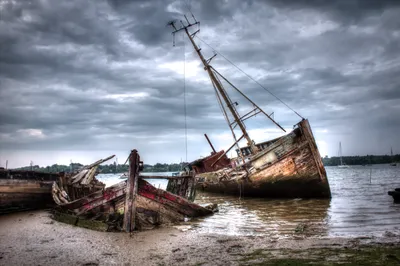
Photograph © Ken Reid
Hosting a Photography Portfolio on GitHub for Free
My photography gallery currently serves 517 full-resolution photos, about 2.1 GB of images, to anyone who clicks on them. My monthly hosting bill for this is zero.
The catch is that GitHub Pages, which hosts this entire site, has a hard rule: a published site may be no larger than 1 GB. My photo collection is bigger than my entire allowance, ignoring all the blog content, and the rest of this website. The workaround is GitHub releases.
Quick jargon guide
- GitHub Pages: GitHub's free static-site hosting, push HTML to a repository and it becomes a website. It's what serves the page you're reading.
- Repository (repo): a project folder tracked by git, holding every file and the full history of every change ever made to it.
- Release: a snapshot of a repository at a point in time, to which you can attach downloadable files ("release assets"), normally installers and binaries, in this post something else entirely.
- Git LFS: Large File Storage, GitHub's official add-on for versioning big files. Solves repo bloat by charging you money instead.
- Egress: cloud-billing jargon for data leaving a provider's servers, i.e. what it costs when someone downloads your photo. The line item that ends up dominating image hosting bills.
- Manifest: a plain list of files (here, a JSON file naming every photo) that a page reads so it knows what exists without asking a server to enumerate anything.
- WebP: a modern image format that compresses far smaller than JPEG or PNG at similar quality, ideal for thumbnails.
- CLIP: an OpenAI model that matches images against text descriptions, which makes it a free, automatic photo-tagger.
Hitting the wall
When I first added my photography to this site, I exported the photos and committed them to the repository like any other asset. It worked, for a good few years. Then at some random point well past the 1GB limit, GitHub let me know, in the nicest possible way, that this was no longer going to fly.
Worse, the damage outlives the mistake. Git never forgets: even after I removed the full-size photos from the site, every committed version of every photo remains in the repository's history. My .git pack sits at 2.47 GiB to this day, a monument to the months when I treated a version control system like a hard drive. (You can scrub history with tools like git filter-repo, but every clone, fork, and local copy has to be reconciled with the rewrite, and for a personal site it has so far been easier to live with the scar tissue.)
So the problem statement became: keep the site on GitHub Pages, keep the photos at full resolution, pay nothing, and stay under 1 GB. The numbers to beat, for the curious:
- 1 GB, maximum size of a published GitHub Pages site (and the recommended ceiling for the repository itself).
- 100 MB, maximum size of any single file pushed to a repository.
- 100 GB/month, the soft bandwidth guideline for Pages sites.
- 2 GiB, maximum size of a single release asset, with no documented cap on the total size of a release.
So: releases are a free bucket
GitHub releases exist so projects can attach compiled binaries to a version tag: you tag v1.0, you upload the installers, users download them. But strip away the intent and a release is just an object store bolted onto your repository. Files up to 2 GiB each, no total-size cap in the documentation, served from GitHub's download infrastructure rather than your Pages allowance, and addressable by a clean, predictable URL:
https://github.com/<user>/<repo>/releases/download/<tag>/<filename>
So my full-size photos live in a release called photos-v1, attached to this very website's repository. Uploading is two commands with the gh CLI:
gh release create photos-v1 --title "Full-size photography" --notes "Gallery originals"
gh release upload photos-v1 photos/*.png
That release now holds all 517 originals, 2.12 GB of them, which is to say: the "attachment" stapled to my repository is bigger than the entire website is allowed to be. GitHub is fine with this. Releases are a supported way to distribute a repository's files, and these are, quite literally, the files this repository's site is built around.
The full pipeline
The release solves storage, but you can't lazily browse a 2 GB folder from a phone. The other half of the architecture is the oldest idea in web galleries: thumbnails for browsing, originals on demand. Here's the whole pipeline, which is a handful of small Python scripts I run locally when I add photos:
- Normalise filenames. Every photo becomes a number:
417.png. NoIMG_20250612_final_FINAL(2).jpg. Numeric names make the manifest trivial and the URLs boring, and boring URLs are the ones that keep working. - Generate thumbnails. Each original gets a compressed WebP thumbnail (
img/photography/thumb/417.webp). These do live in the repository, one for every photo in the gallery (517 of them), because collectively they're small enough to sit comfortably inside the Pages budget. The only other copies of my photos the site hosts are 91 wide crops for the tops of pages and posts (this one's included), 8.9 MB between them, and the share cards made from those crops for when a post gets linked somewhere. - Auto-tag with CLIP. A local script runs every photo through OpenAI's CLIP model to classify it (landscape, urban, wildlife, winter…) and writes the results to a JSON file, all except black and white, which a second script decides from the pixels. I wrote about the CLIP part in its own post; those tags drive the gallery's filter buttons, and I never manually categorise anything.
- Write a manifest. A JSON list of every filename in the release. The gallery page fetches this instead of asking the GitHub API, so the site works even when the API is rate-limiting.
- Upload the originals to the release with
gh release upload, and commit the thumbnails plus six JSON files: the manifest, a shorter list for the photo strip, the tags, the map locations, and two that a script regenerates, the thumbnail sizes (so the gallery can lay out its rows before a single image arrives) and the photo count on the colophon.
Since step 2 is where the actual "optimisation" happens, here it is in full, this is the entire thumbnail pipeline, and it hasn't needed to change in years:
from pathlib import Path

from PIL import Image
from tqdm import tqdm

PHOTOS = Path("img/photography")
THUMBS = PHOTOS / "thumb"
WIDTH = 400
QUALITY = 80

THUMBS.mkdir(exist_ok=True)
photos = sorted(PHOTOS.glob("*.png"))

before = after = 0
for photo in tqdm(photos):
    img = Image.open(photo).convert("RGB")
    height = round(img.height * WIDTH / img.width)
    thumb = img.resize((WIDTH, height), Image.LANCZOS)

    out = THUMBS / (photo.stem + ".webp")
    thumb.save(out, "WEBP", quality=QUALITY)

    before += photo.stat().st_size
    after += out.stat().st_size

print(f"{len(photos)} photos, {before/1e6:.0f} MB -> {after/1e6:.1f} MB "
      f"({1 - after/before:.0%} saved)")
Three choices doing the work. LANCZOS is the slowest and best-looking of Pillow's resampling filters, at thumbnail sizes the difference from the default is visible, and the extra seconds are irrelevant for a batch job. convert("RGB") drops the alpha channel the PNGs carry but the thumbnails don't need. And WebP at quality 80 is the sweet spot where artefacts stop being visible at 400px before the bytes stop shrinking. Net effect: a ~4 MB PNG becomes a ~17 KB thumbnail, and the whole gallery's browsing layer, all 517 thumbnails, weighs 9 MB, less than three originals.
At view time, the gallery JavaScript loads the manifest, adds thumbnails about 24 at a time as you scroll (each batch runs on to the end of its row, and after 72 a Load More button takes over, so you can still reach the bottom of the page), and each lightbox link points at the release URL for the original. The visitor's browser talks to GitHub's release servers directly; my Pages bandwidth only ever carries the thumbnails.

Why not the "proper" solutions?
Git LFS is GitHub's own answer to large files, and it would have been the natural choice, except the free tier is a single gigabyte of storage and a similarly small monthly bandwidth allowance, after which you're buying data packs. It solves the repository-bloat problem while replacing "free" with "subscription".
Object storage (S3, Cloudflare R2, Backblaze B2) is a good answer and I'd use it for anything commercial. But it means an account, a bucket policy, a billing alarm, and a second system to maintain for a personal site whose entire ethos is "one repository contains everything". My gallery's originals sit next to the code that serves them, in the same repo, behind the same login, and I'm lazy in odd ways.
Photo platforms solve a different problem, community and discovery, and charge accordingly. For raw hosting, here's the rough picture as of mid-2026 (prices drift; check before you commit):
| Option | Rough cost for ~2 GB + modest traffic | Notes |
|---|---|---|
| Flickr Pro | ~$70–90/year | Unlimited storage, but your portfolio lives on their site, in their design. |
| SmugMug | ~$100+/year | Polished portfolio hosting; really good, really not free. |
| Amazon S3 + egress | Pennies for storage, ~$0.09/GB served | The bandwidth line item is the one that surprises people. |
| Cloudflare R2 | ~Free at this scale | Free egress and a generous free tier; the strongest alternative. Still a second account and billing surface. |
| GitHub release | $0 | Everything in one repo. You're reading the case study. |
The caveats
- No contract. GitHub documents release assets as a distribution feature; they don't promise it as a CDN. If your traffic looked like abuse, they'd be within their rights to object. A personal portfolio's click-through traffic is nowhere near that territory, but a startup's image backend would be.
- Public means public. Release assets on a public repo are accessible to anyone with the URL. Fine for a portfolio, since a portfolio's job is to be seen; wrong for anything private.
- URLs are tied to the repo. Rename your account or repository and every deep link changes. Choose boring, stable names.
- No image processing. S3-with-a-CDN setups can resize on the fly. Here, every size you serve is a size you generated yourself. I need two: thumbnail and original.
- Don't commit the originals, ever. The release replaces the repo for full-size files, it doesn't supplement it. Learn from my 2.47 GiB of permanently embarrassing git history.
Constraints make better sites
The 1 GB limit made the gallery better. Being forced to split hot data (thumbnails, manifest, tags) from cold data (originals) is just good architecture, the same shape as any cache-and-archive system. The gallery loads fast on bad connections because it physically cannot ship the heavy files up front.
Total infrastructure: one repository, one release, six JSON files, and a few local Python scripts. Total cost: nothing. The photos are backed up, versioned adjacent to the site that shows them, and served by one of the most reliable download infrastructures on the internet.
Common questions
Is this against GitHub's terms of service?
Releases are for distributing a repository's files, and these are the files this repository's website is built from, so I'm comfortable it's within both the letter and spirit. What the terms do prohibit is using releases as a general-purpose CDN for content unrelated to the repo, or serving traffic at a scale that disrupts the service. Host your portfolio, not your startup's user uploads.
What happens if GitHub kills the loophole?
Then I run one script to re-upload 517 files somewhere else (probably Cloudflare R2) and change one URL prefix, KR_RELEASE in js/shared-components.js. Then a find-and-replace for the places that spell the whole URL out: the lightbox code, the map page's fallback, and a handful of posts that link an original directly.
Why PNG originals instead of JPEG or WebP?
PNG is a lossless container I trust for archival, and storage is (see above) free.
Could I do this without the command line?
Yes, releases can be created and files uploaded entirely through GitHub's web interface (Releases → Draft a new release → drag files in). The CLI just stops being optional somewhere around your fiftieth photo.